Jump to Content
Acefone India New
HomeGuidesAPI ReferenceRelease Notes
Log InAcefone India New
Guides
Log In
HomeGuidesAPI ReferenceRelease Notes
All
Pages
Start typing to search…

Introduction

  • Getting Started
  • Dashboard
  • Profile
  • Change and Forgot Password
  • Sign Out

live or active calls

  • Active Calls

Users

  • Add User
  • All Users
  • Pending Users

Billing

  • Billing Dashboard
  • Online Payments
  • Offline Payments
  • Transactions
  • Due Charges
  • Monthly Account Summaries
  • Billing Logs

services

  • My Numbers
  • Time Groups
  • Time Conditions
  • IVR
  • Auto-Attendant
  • Agents
  • Departments
  • System Recordings
  • Voicemail
  • Outbound Services
    • Manage Campaigns
      • Dialer Campaign
      • Broadcast Campaign
    • Dialer Inbound Queue
    • Lead Lists
    • Disposition List
    • Pause Code Lists
    • Account DND List
    • Quick Transfer List
    • CSAT Survey
    • Dialer Skills List
    • Agent Script
    • TTS
    • Reports
    • Deleted Call Broadcast
  • Manage Contacts
  • Template Management
  • Dynamic Dialplan
  • Short URL Campaign
  • AC-CID Lists
  • Agent Disposition
  • Survey Campaign
  • Scheduled Calls

third party app integration

  • Interactions Hub Integrations
    • How to Integrate Zoho CRM
    • How to Integrate Freshdesk CRM
    • How to Integrate HubSpot CRM
    • How to Integrate Salesforce CRM
    • How to Integrate Bitrix24 CRM
    • How to Integrate Leadsquared CRM
  • Contact Center Studio Integrations
    • Zoho CRM
      • Zoho CRM Overview
      • Zoho CRM Integration Guide
      • How to use Zoho CRM
    • Leadsquared CRM
      • Leadsquared CRM Overview
      • Leadsquared CRM Integration Guide
      • How to use LSQ CRM
    • Salesforce CRM
      • Salesforce CRM Overview
      • Salesforce CRM Integration Guide
      • How to use Salesforce CRM
    • Freshsales CRM
      • Freshsales CRM Overview
      • Freshsales CRM Integration Guide
      • How to use Freshsales CRM
    • Freshdesk CRM
      • Freshdesk CRM Overview
      • Freshdesk CRM Integration Guide
      • How to use Freshdesk CRM
  • Acefone Microsoft Azure AD
  • Acefone Google SSO Integration

API Connect

  • Webhook
    • Call Hangup Cause Codes (Q.850 Standard)
  • API Dialplan
  • API Tokens
  • Click to Call Support API

Call detail records

  • Call Detail Records (CDR)

INSIGHTS

  • Insights Dashboard
  • Call Analytics
  • Agent Performance Dashboard
  • Call Logs
  • AI Post-Call Analytics (PCA)
    • Call Overview Section
    • Agent & Customer Scores
    • Call Recording & Playback
    • Call Transcript
    • AI Call Summary
    • AI Insights: Moments & Quality Evaluation
    • Auto-Generated vs Manual Components
  • Download Manager
  • Disposition Analytics
  • Video Analytics
    • Video Log Page
    • Video Details Page
  • Message Analytics
    • Message Details page

reporting

  • Reporting Overview
  • Real Time Reporting
    • Active Calls
    • Agent Real Time Report
    • Department Wallboard Report
    • Dialer Real Time Report
  • Call Details
    • Call Detail Records (CDR)
    • Call Logs
  • HPBX Reporting
    • Agent Performance Report
    • Department Performance Report
  • Dialer Reporting
    • Dialer Agent Break Summary Report
    • Dialer Agent Performance
    • Dialer Campaign Performance
    • Dialer Campaign/Queue Half Hourly Summary Report
    • Dialer Agent Time Entry Report
    • Dialer Webform Report
    • Dialer Schedule Callbacks Report
    • Dialer CSAT Report
  • General
    • Custom Reports
    • Call Stats
    • Number-Wise Report
    • SIP Utilization Report
    • Channel Utilization Summary Report
    • Missed Call Report
  • Logs
    • Messaging Logs
    • SMS Logs
    • Webhook Logs
    • Activity Logs
    • API Logs
    • Email Logs

INTERACTIONS

  • Onboarding Guide (Old Channels Hub)
  • Onboarding Guide (New Channels Hub)
  • Template Management
  • Permission to Users
  • Interactions Error Codes
  • FAQs on Interactions

Channels Hub

  • Manage Payment Details for a WABA in Meta Business Suite
  • Pre-requisites & Prep for WhatsApp Channel
  • Supported Media Types for WhatsApp

VOICE STREAMING

  • Bi-Directional Audio Streaming Integration Document
  • Dynamic and Static WebSocket options in the Voice Streaming page
  • Standard Operating Procedure (SOP) for VOICE Streaming

Settings

  • User Management
    • Manage Roles
      • Add User Role
      • All Roles
    • Manage Team
      • All Members
  • Manage Settings
    • Manage SFTP
      • Add SFTP
      • All SFTP
  • IP Pool Whitelisting
  • Channels
  • Business Information
    • Profile
    • Notification Management
  • Reset Password
  • Logo Management
  • CDP List Management
  • Sign Out

MISCELLANEOUS DOCUMENTATION

  • Click to Call and Service Management App
    • IOS
    • Android
    • FAQs
  • AceConnect

POLICIES

  • Data Retention Policy
Powered by 

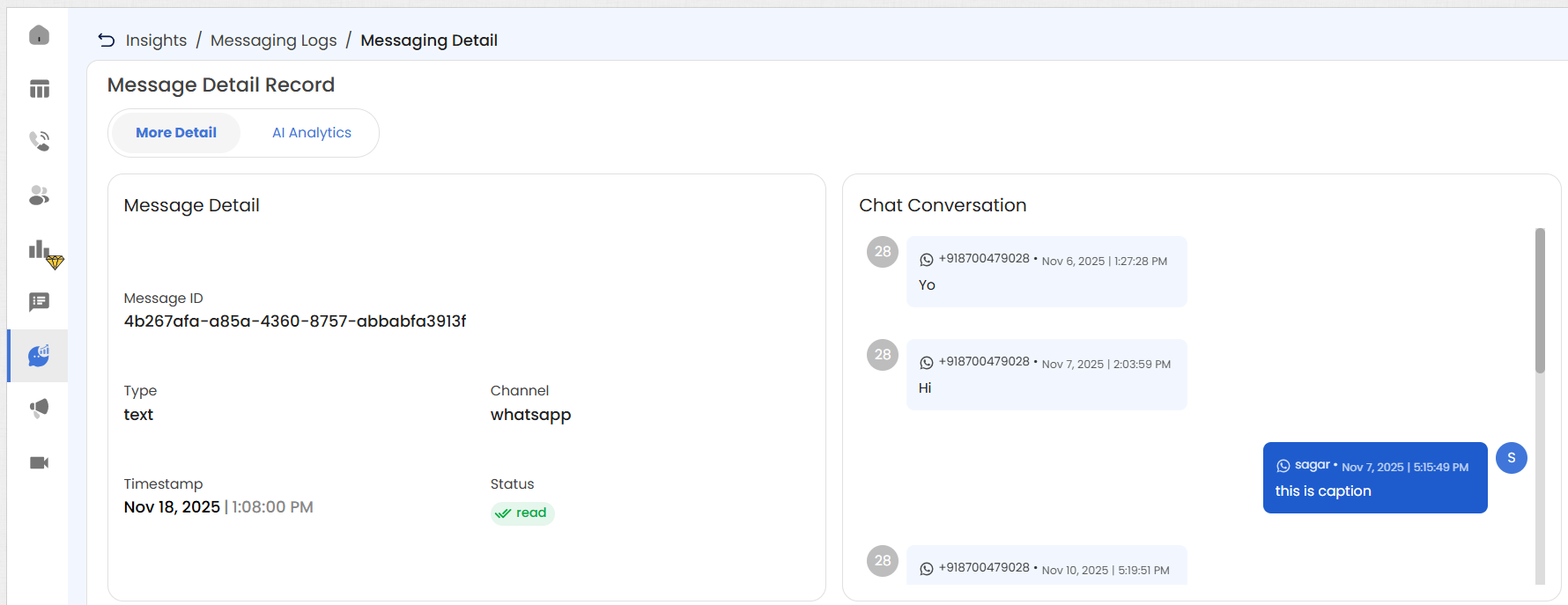
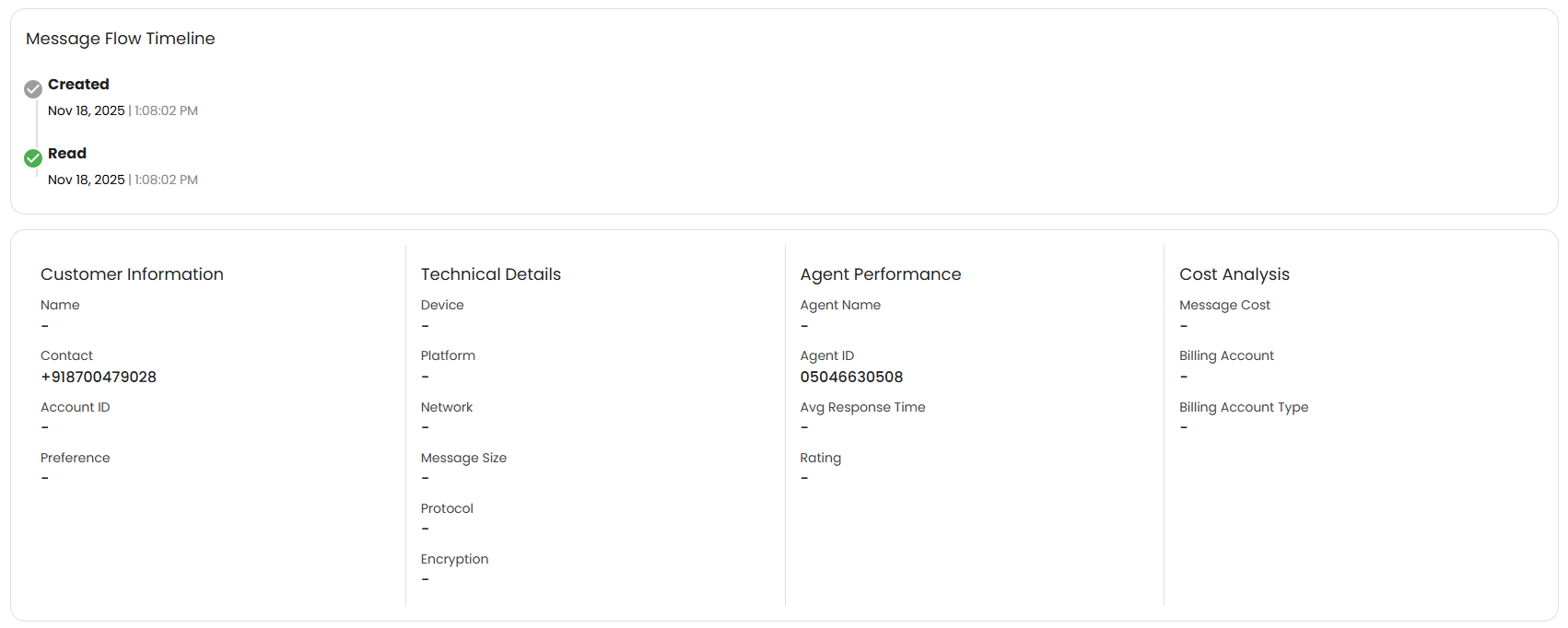
Message Details page

Updated 5 days ago


Message Analytics
Reporting Overview