
Call Overview Section
Before analyzing how a call went, you need to understand what the call actually was.
The Call Overview section gives you that context instantly.
.
Getting started with Calls overview section
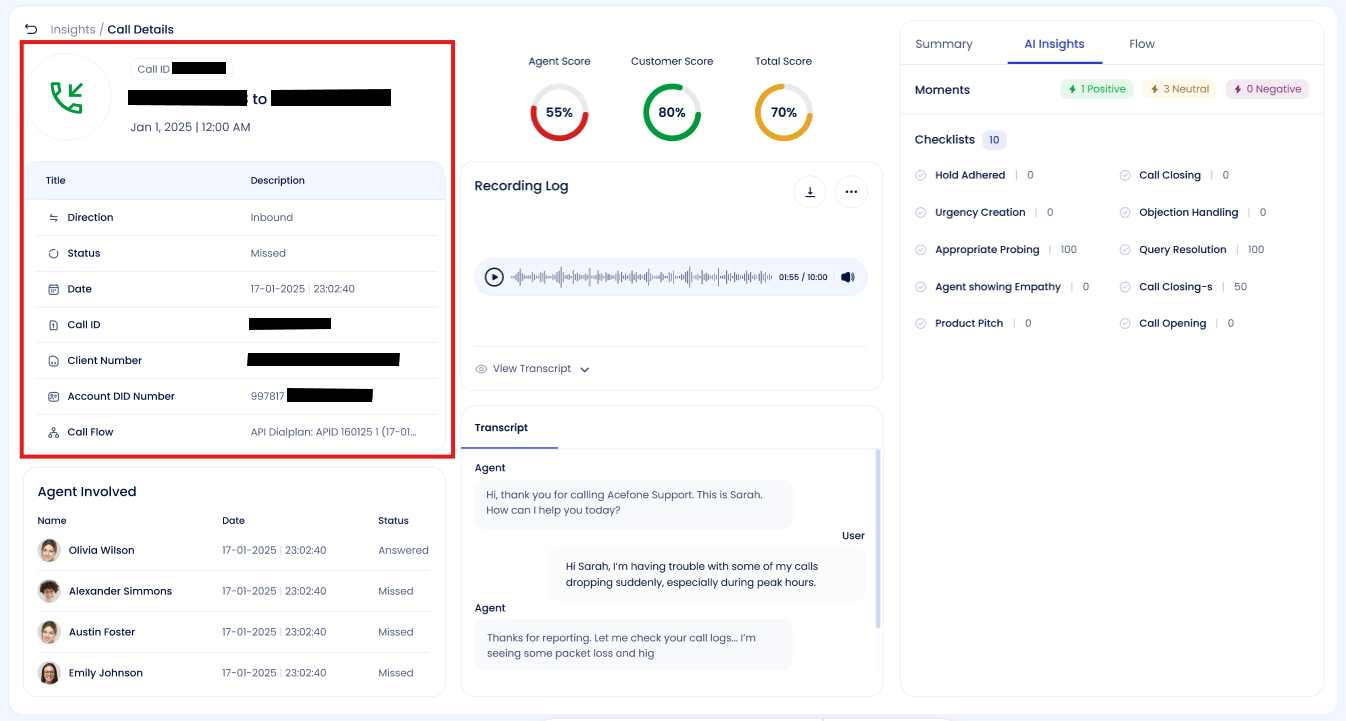
The Call Overview Section pulls core call details directly from the telephony system—no AI interpretation, no manual inputs.
What You’ll See Here
For every call, the following information is displayed:
- Call ID – A unique identifier used for tracking and support references
- Caller → Receiver Number – Who called whom
- Call Date & Time – When the call occurred
- Direction – Inbound or Outbound
- Call Status – Answered or Missed
- Client Number – Linked customer or account number
- Account DID Number – DID used for the call
- Call Flow / Dial Plan – The routing logic used for the call
Why This Section Matters
This is your starting point for any investigation.
Use Call Overview when:
- A customer reports a missed or dropped call
- You’re validating routing or dial plan behavior
- You need to cross-check a call during audits
- You’re referencing a call in internal discussions or tickets
Data Source
📌 All information here is system-generated and reflects exactly what happened at the telephony level.
No edits, tagging, or AI processing involved.
Pro Tip
If you’re raising a support ticket or escalation, always include the Call ID from this section.
Updated 8 months ago
Did this page help you?