
Call Logs
Call Logs Dashboard Overview
The Call Log Page in the Insights section presents a simplified view of all calls made or received. It is designed to help users track and review call activity effectively.
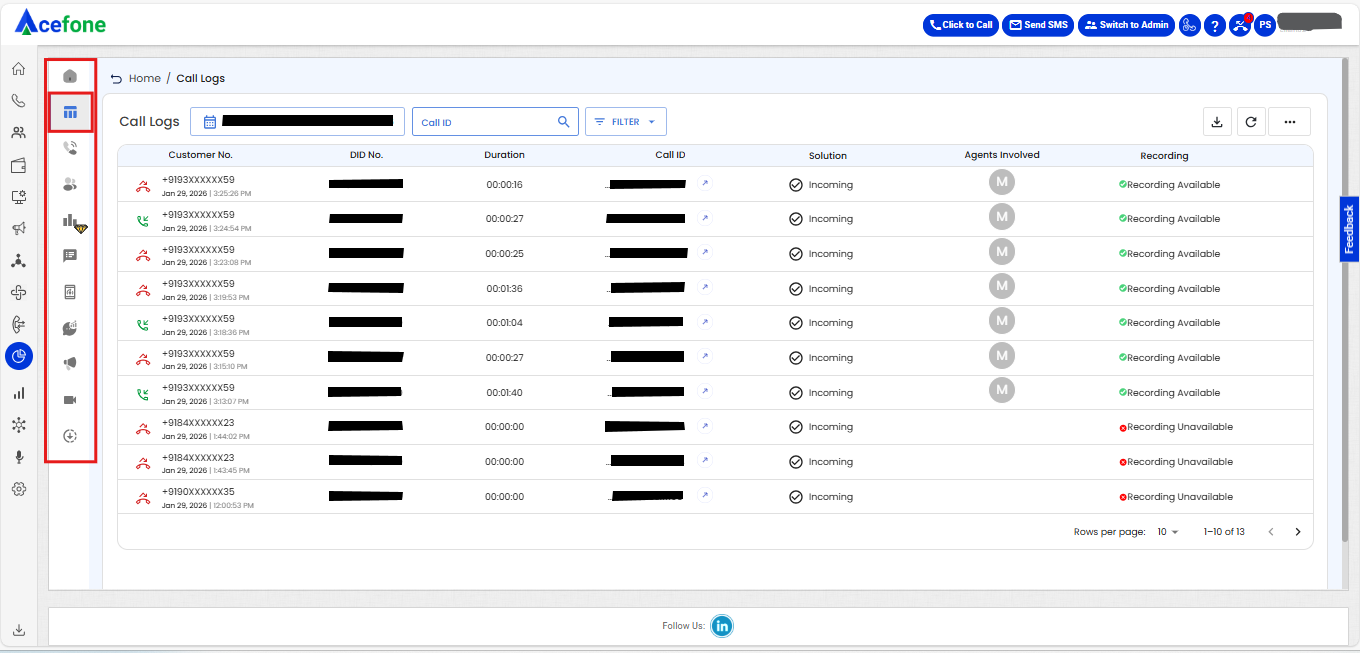
Call Log Fields
| Field | Description | Possible Values |
|---|---|---|
| Customer Number | The phone number of the end customer or caller who initiated or received the call through the portal. Identifies the person or entity on the other side of the call. | +91876547XXXX |
| DID Number | The phone number assigned to a specific agent or department that received the call. Shows which DID number was dialed to reach the contact center. | +91123456XXXX |
| Duration | The total length of the call, measured from the start ring time to the end of the call. | hh:mm:ss |
| Call ID | A unique identifier assigned to each call. Useful for tracking and referencing specific calls across systems and reports. | 1234.56789 |
| Solution | The specific call handling method or service used for the call, indicating how it was processed by the contact center. | 1.Click-to-Call 2.Dialer 3.Incoming 4.Broadcast 5.WhatsApp |
| Answered by Agent | The identifier (name or ID) of the agent(s) who answered or handled the call. If unanswered, this field may be blank. | Agent Name or Agent ID |
| Recording | The audio recording of the call. | Recording Player |
Currently, call recordings are available only for the initial leg and first transfer of a call. If a call undergoes multiple transfers, recordings for the subsequent transferred legs are not captured. This is by design to ensure optimal recording stability and performance. We're evaluating extended support based on demand and technical feasibility.
📅 Date & Time Filter Panel
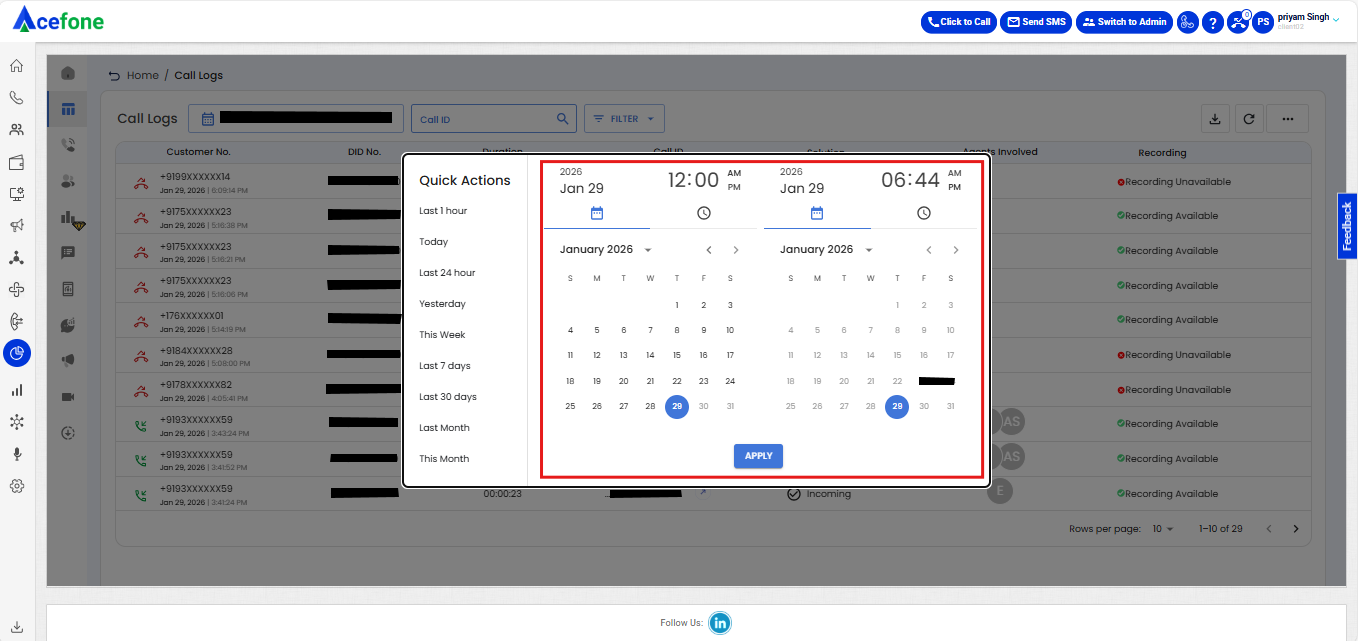
The user can select a specific date and time range to filter call logs using the date-time picker. This provides precision in narrowing down the call data.
Features:
- From Date and Time: Left-side panel (e.g., May 11, 2025 at 12:12 AM).
- To Date and Time: Right-side panel (e.g., June 10, 2025 at 12:12 AM).
- Time Selection: Clickable clock icons allow users to set hours and minutes.
- Calendar UI: Monthly view for quick navigation.
- Apply Button: Filters the call logs based on selected range.
⚡ Quick Actions
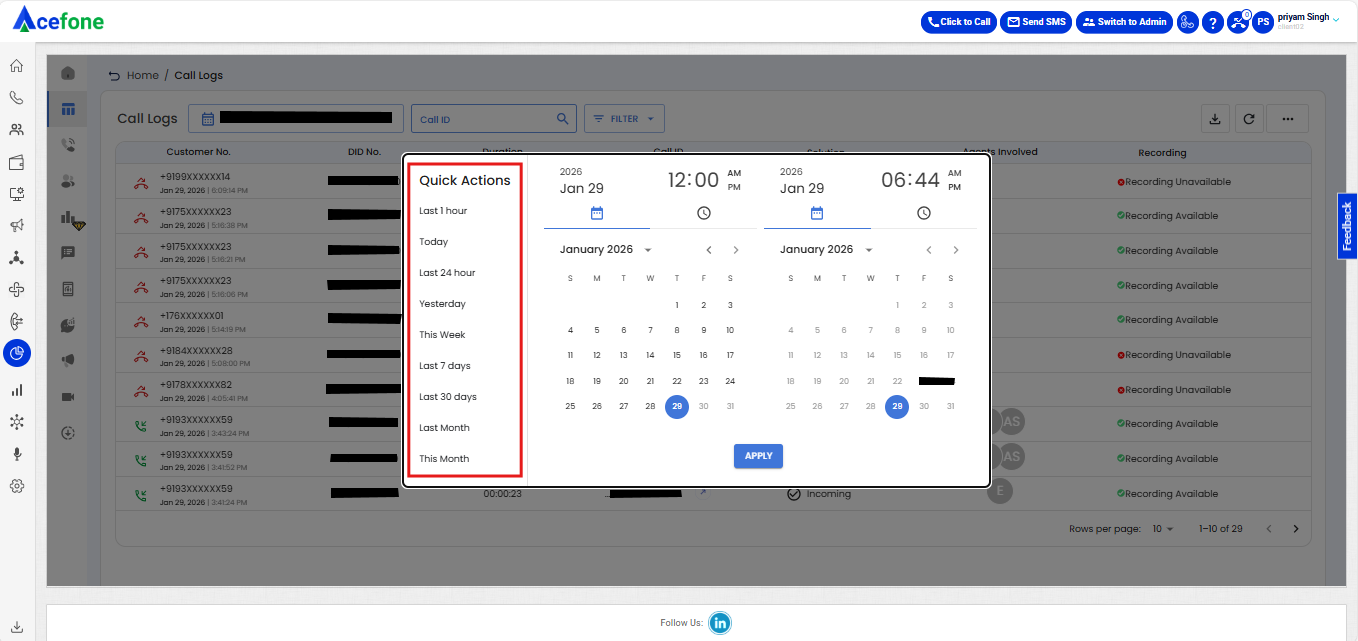
Located on the left of the date picker, this list allows users to instantly filter calls based on preset durations:
- Last 1 hour
- Today
- Last 24 hours
- Yesterday
- This Week
- Last 7 days
- Last 30 days
- Last Month
- This Month
These shortcuts improve usability by reducing the effort needed for frequent queries.
🔎 Additional UI Elements
- Call ID Search Bar: Lets users search specific call logs using the unique Call ID.
- Filter Button: Provides advanced filtering based on multiple parameters.
- Export Button: (Top right) Enables downloading the call log data.
- Recording Player: Inline players for listening to call recordings.
- Pagination Controls: Bottom right for navigating through pages of log entries.
- Rows per page Selector: Customize how many log entries are shown per page.
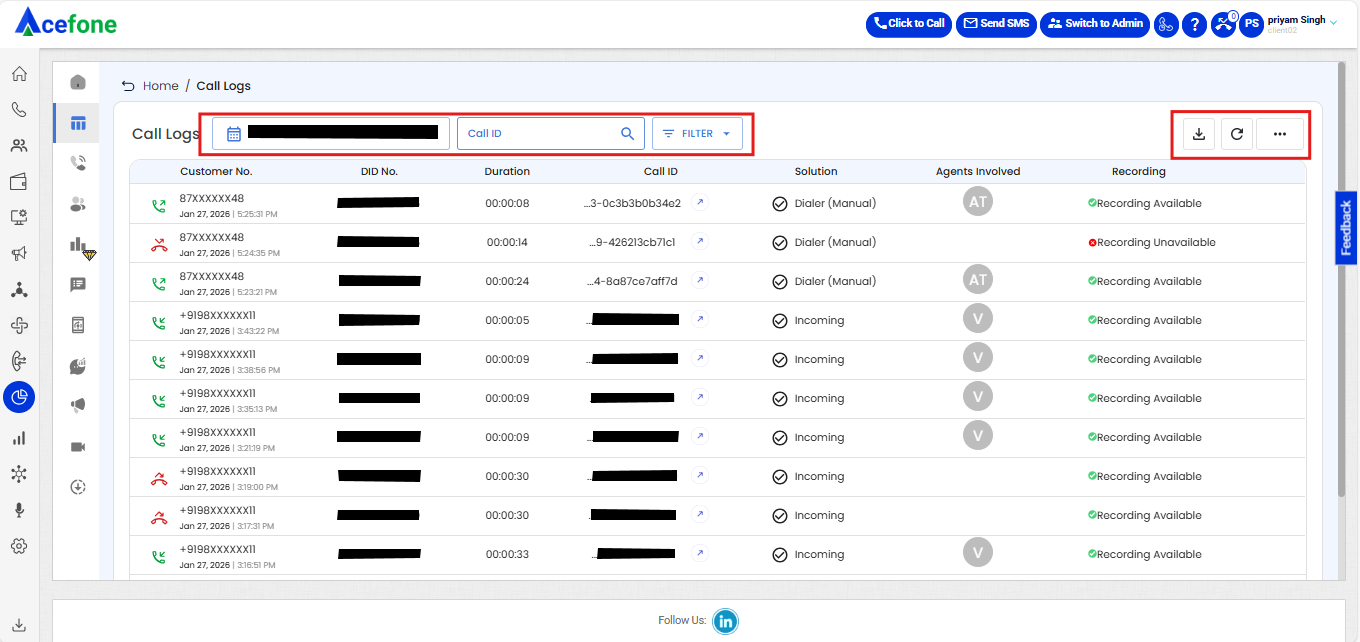
- Icons for Call Type:
- Green phone = Answered
- Red arrow = Missed or disconnected
These features collectively offer granular control and visibility over telephony activity, aiding in analysis, auditing, and operational insights.
Call Log Data Availability (SLA)
Call Log Update SLA
Call records are typically available on the Call Logs page within 5–10 minutes after the call ends.
Note
Under normal system conditions, call data is processed and reflected within the above SLA.
In rare cases involving high system load or temporary processing delays, the update may take slightly longer. If a call is still not visible after the expected SLA, please contact the support team for further investigation.
FAQ:
Why does Ring Time differ between the Report and Agent Details (Call log UI)?
Q: Why is Ring Time showing as 0 in the Report for a missed call, but the Agent Details section shows a different value (e.g., 2 sec)?
A: The Report and Agent Details sections calculate ring time using different logic, and both are correct — they're just answering different questions.
1. How Ring Time is calculated in the Report
agent_ring_time = round(answer_time - min(dialed_time of all agents))This formula depends on answer_time, which only exists if the call was answered. As a result, Agent Ring Time is not displayed in the report for:
-
Click-to-Call call type
-
Missed calls
For all other call types:
-
Dialer/Incoming calls: Report shows the ring time of the first agent involved.
-
Broadcast calls: Report shows ring time only if an agent was involved; otherwise, it shows N.A.
2. How Ring Time works in Agent Details (Call log UI)
This section shows the actual ring duration from the call log, per agent, regardless of whether the call was answered or missed. It's not dependent on answer_time, so it always reflects real signaling duration.
3. Bottom line
| Report | Agent Details (CDR UI) | |
|---|---|---|
| Based on | answer_time - dialed_time formula | Raw call log (per agent) |
| Missed calls | Not shown / 0 | Shown accurately |
| Click-to-Call | Not shown | Shown accurately |
| Use case | "How long to answer?" | "How long did it actually ring?" |
Takeaway: For missed calls, Click-to-Call calls, or when exact per-agent ring time is needed, refer to Agent Details / Call log UI — the Report does not compute this value for those cases by design.
Insights Landing Page KPI Visibility & Access
Q: Are the KPIs on the Insights Landing Page specific to individual team members?
No. The KPIs on the Insights Landing Page are displayed at the Account/Client level and represent the overall account-level performance.
Q: Can all team members see these KPIs?
Yes. The KPIs are visible to team members based on their access to the Insights platform. However, the data shown represents the overall account/client metrics, not individual team-member performance.
Q: Do team-member-specific filters apply to the Landing Page KPIs?
No. Conditions such as CDR user-based filtering or assigned DID filtering do not apply to the KPIs on the Insights Landing Page.
Q: Where are user-level and DID-level access conditions applied?
These conditions are applied at the Call Log and CPD levels, where data is filtered and displayed based on the respective user's access permissions and assigned DIDs.
Q: Why might the Landing Page KPIs differ from the data visible to a specific user in Call Logs or CPD?
The Landing Page provides an account-level view, whereas Call Logs and CPD apply user-level access and DID-based filtering. Therefore, the Landing Page KPIs may include data that is not visible to an individual team member in Call Logs or CPD.
Updated about 1 month ago